
Typing Test on Mobile and Tablet
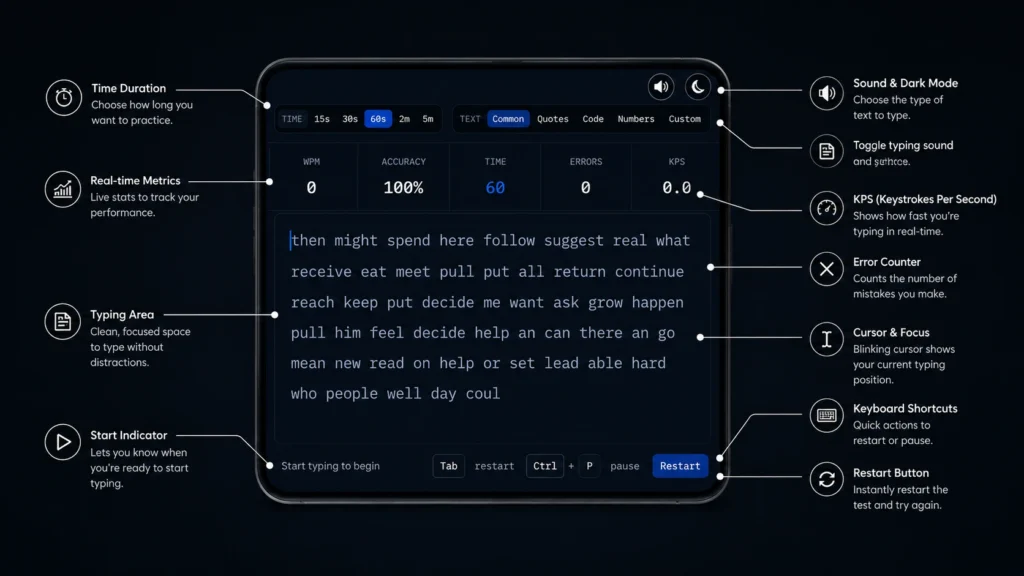
A mobile typing test proves how fast you can type on the touch-typing screen of your mobile with our online free typing test tool. Unlike desktop typing tests, mobile typing tests target thumb typing, swiping, autocorrect handling, and touchscreen accuracy. Whether you are an Android or iOS user, this test is suitable for both. This tool is especially made for mobile. You can easily type on your mobile screen anytime, anywhere.
- WPM
- 0
- Accuracy
- 100%
- Time
- 60
- Errors
- 0
- KPS
- 0.0
Paused time is not counted.
How it works?
Step 1: Start the test, and the timer will start automatically.
Step 2: Start typing the paragraph the same as shown on the mobile screen.
Step 3: Complete the test on time and get real-time results.
Step 4: The results displayed on screen can consist of:
Why Improve Mobile Typing Speed?
Improving mobile typing speed can lead you to excellence on these tasks:
Mobile Keyboard Speed Challenge
This keyboard Speed Challenge is customized for mobile typing tests, mostly run with Tablet or smartphone keyboards. Different challenges we offer with our tool are:
Difficulty Levels in Our Mobile Typing Test
Easy Level
This level is for beginners and only uses short sentences with common words and basic grammar.
Medium level
Medium level includes long sentences with punctuation and long words.
Hard level
Hard level consists of numbers, symbols, and common vocabulary.
Expert level
Expert level is designed for long plus hard words typing, Mixed case, emojis and special characters.
Free Mobile Test – Measure WPM
WPM measures how many words you can type in a set timer on your phone and tablet. The common set time is between 15 and 60 seconds. It can also measure accuracy.
Free Mobile Test – Measure Accuracy
A free mobile typing test measures accuracy, but it depends on different aspects like the mobile technology behind it. Different features of different mobiles, like GPS accuracy, touchscreen responsiveness, sensor precision, internet speed, battery and network performance, impact typing accuracy. As this tool with such features and useful insight can measure accuracy better
How this mobile typing test is Useful?
This tool is free to use and works on both Android and iPhone. There is no need to download an app for the typing speed test. This tool gives instant results. Daily practice improves accuracy and speed. This tool is best for beginner, expert and advanced users.
Best Practices for Faster Thumb Typing
Typing with your thumb is the most comfortable and easiest way to type on smart phones. If you are writing messages, sending emails or taking a mobile typing test, with the right typing technique, it will become easy and accurate.
For practice of mobile typing with your thumb, you should hold your phone correctly. Use both thumbs instead of fingers for smooth running. Your thumb should relax and focus on accuracy more than speed. Practice regularly will make you perfect.
Learn your keyboard layout, then start typing. There is no need for unnecessary correction or tracking your progress. You can increase your typing speed by focusing on accuracy.
Common Mobile Typing Test Mistakes
- Typing too fast without focusing on accuracy
- Use only one thumb
- Looking at the keyboard more often
- Overusing the backspace key
- Ignoring the keyboard settings.
- Not relaxing your hand.
- Not doing practice daily.
- Depending on autocorrection
- Not taking typing tests more often.
Avoiding these common mistakes can improve typing speed.
Final Thoughts
The mobile typing test is a more effective way to measure speed more quickly and accurately on your smartphone and tablets. Whether you are a student, professional, or a common smartphone user, you can clearly type well with consistent test-taking.
By practising consistently using proper thumb impressions, minimising common errors, and focusing on accuracy, you can increase your mobile typing speed.
Our typing tool works on both Android and iOS, providing instant results and insights with a download and without registration. Monitor your performance and progress, and challenge yourself daily with our challenging test.